
1. GO TO PHONE SETTINGS, SELECT CONNECTION.

2. CHOOSE ACCESS POINTS.

3. PRESS OPTIONS THEN SELECT NEW ACCESS POINT.

4. FOLLOW WHAT YOU SEE IN THIS SCREENSHOT AND THE OTHERS JUST LEAVE IT ALONE. (note) IN THE ACCESS POINT NAME TYPE IN internet INSTEAD OF http.globe.com.ph IF YOU ARE USING SMART.

5. PRESS OPTIONS SELECT ADVANCED SETTINGS.

6. SELECT PROXY SERVER ADDRESS, ENTER 80.239.242.113 AND THEN PORT 80. PRESS BACK TO SAVE.
Activate it as your default connection and default application configuration.

for globe change custom HTTP Server to http://twitter.globe.com.ph
leave others blank then

like this
Afterwards you may browse the net with your opera mini.
The speed of connection always depends on the proxy address we are using. You can search for more proxies at google.. :)
Sorry for the screenshots, I got it from different links.. I will edit this tutorial to make it more explained next time. But right now I hope you understand this. thank you.
leave others blank then
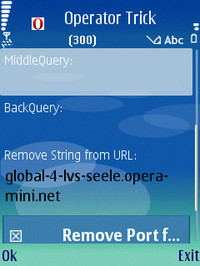
like this
Afterwards you may browse the net with your opera mini.
The speed of connection always depends on the proxy address we are using. You can search for more proxies at google.. :)
Sorry for the screenshots, I got it from different links.. I will edit this tutorial to make it more explained next time. But right now I hope you understand this. thank you.

No comments:
Post a Comment